Data
System Performance
Analysis Example from the Chromaster 60 MPa System
The 60 MPa system, which can be used with columns containing 2.0 µm or smaller particles, and core-shell columns, is capable of conventional HPLC analysis and also ensures improved resolution performance and shorter analysis time.
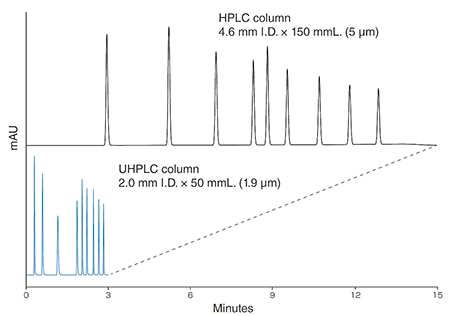
Conditions| Sample | Alkylphenones |
|---|
| Column | LaChrom II C18 (5 µm) 4.6 mm I.D. × 150mmL
LaChromUltra II C18 (1.9 µm) 2.0 mm I.D. × 50 mmL |
|---|
| Column temperature | 40 °C |
|---|
| Mobile phase | A: H2O, B: CH3CN |
|---|
| Gradient mode | High Frequency Mode |
|---|
| Wavelength | 247 nm |
|---|
The following options are used with UHPLC column
- Low dispersion piping kit
- Semi-micro mixer (200 µL)
- Semi-micro flow cell unit
Example of Carry-over analysis (5260)
Even when highly adsorbing Chlorhexidine is analyzed, the carry-over is extremely low.
Easy-to-use
Analysis Example from the Chromaster 60 MPa System
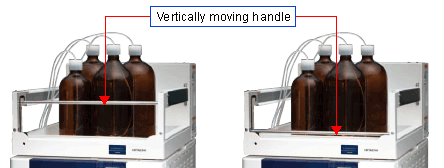
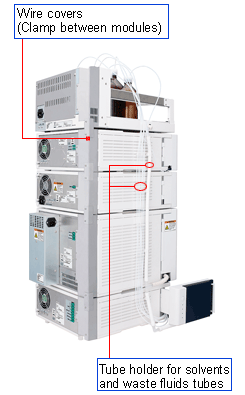
Most optional accessories are internally mounted to reduce HPLC system height. The handle located on the front side of the organizer moves vertically for easy access to solvent bottles.
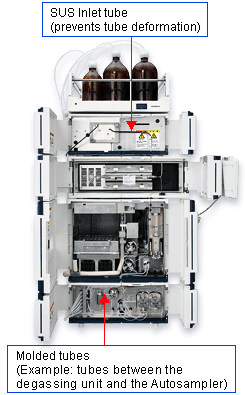
Module operations and the replacement of consumable and maintenance parts can be performed from the front side.
With attention to detail on the housing of tubes and wires, the system keeps tubes from getting tangled up, ensures the ease of replacement, and provides adequate seismic stability.
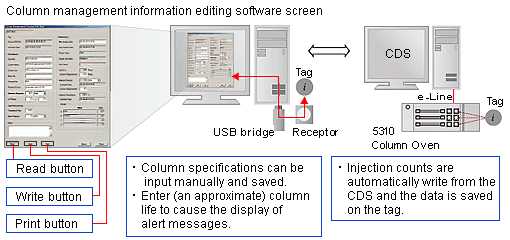
Column management system (optional)
Hitachi column management system can manage the Log information on analytical columns and guard-columns from any manufacturer.
Log information can be written and read through a connector mounted on the column oven or USB port in the computer. ID Tags can be used repeatedly*.
- * Approximate read/write life time : 100,000 times

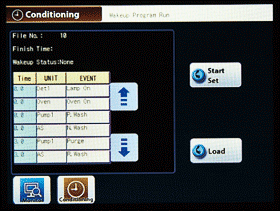
Wakeup (automatic pre-analysis tasks) and Sleep (automatic post-analysis tasks) programs
Automatic system Wakeup and Sleep from GUI
- In Conditioning, up to 10 programs can be created by combining any of the module settings, such as pre-analysis tasks of system (Wakeup), and post-analysis tasks of system (Sleep).
- For Wakeup program ending time, you can specify any time on current day, the following day, or two days later.
- The Sleep program starts at a specified time on the current day/the following day, or after the end of a continuous analysis run.
The automation of system stand-by can reduce the amount of time required to make preparations for an analyses run.